
The most common Australia trademark search mistake happens before anyone opens IP Australia's trade mark register. You register a business name with ASIC (the Australian Securities and Investments Commission), buy the matching .com.au, and assume the name is yours. Neither one gives you trade mark rights, and neither one appears in the trade mark register.
The second mistake comes right after it. You find the register, type your name into the search bar, get zero results, and relax. That search bar doesn't look for sound-alikes. The Phonetic and Fuzzy matching that catches a near-identical name in your Nice class sits in advanced search, which is easy to miss. (Nice classes are the international system for sorting goods and services into 45 categories.)
The official register is Australian Trade Mark Search. It's free and you don't need an account. This guide walks you through an IP Australia trademark search step by step: which searches to run, which operators to use, how to read the status labels, and what the register can't tell you. It's written for anyone filing in Australia for the first time, expanding in from overseas, or naming a business there.
What Australian Trade Mark Search Covers (and Where ATMOSS Went)
IP Australia's Australian Trade Mark Search replaced an older system called ATMOSS, which is why that name still turns up in older guides and search suggestions.
A quick spelling note: Australia writes "trade mark" as two words. This guide uses "trade mark" for Australian tools and law, and "trademark" for the general concept.
The register holds three kinds of records:
- Registered and pending marks. Everything currently protected, plus every application still working its way through.
- Dead marks. Removed, refused and never-registered records stay visible as history.
- International registrations designating Australia. The Madrid Protocol lets a brand owner file one international application that covers multiple countries. Australia joined in 2001, so international registrations that designate Australia appear in the Australian register alongside national filings.
What the register leaves out is just as important. Unregistered marks aren't there. ASIC business names aren't there. Company names and .com.au domains aren't there. If someone has been trading under your name for ten years without filing anything, the register shows you nothing.
How to Run an IP Australia Trademark Search (Step by Step)
Australian Trade Mark Search has two modes. Quick search is a single bar with no saved searches and no reports. Advanced search adds match types, up to four word or image terms, filters, saved searches, a My List feature and PDF reports. You'll use both.
The examples below use TALLOWMERE, an invented outdoor apparel brand. Every conflicting mark mentioned in this guide is made up too.
Step 1: Run a quick search on your name
Start with the quick search bar. It covers trade mark words, owner names, trade mark numbers and International Registration numbers in one field.
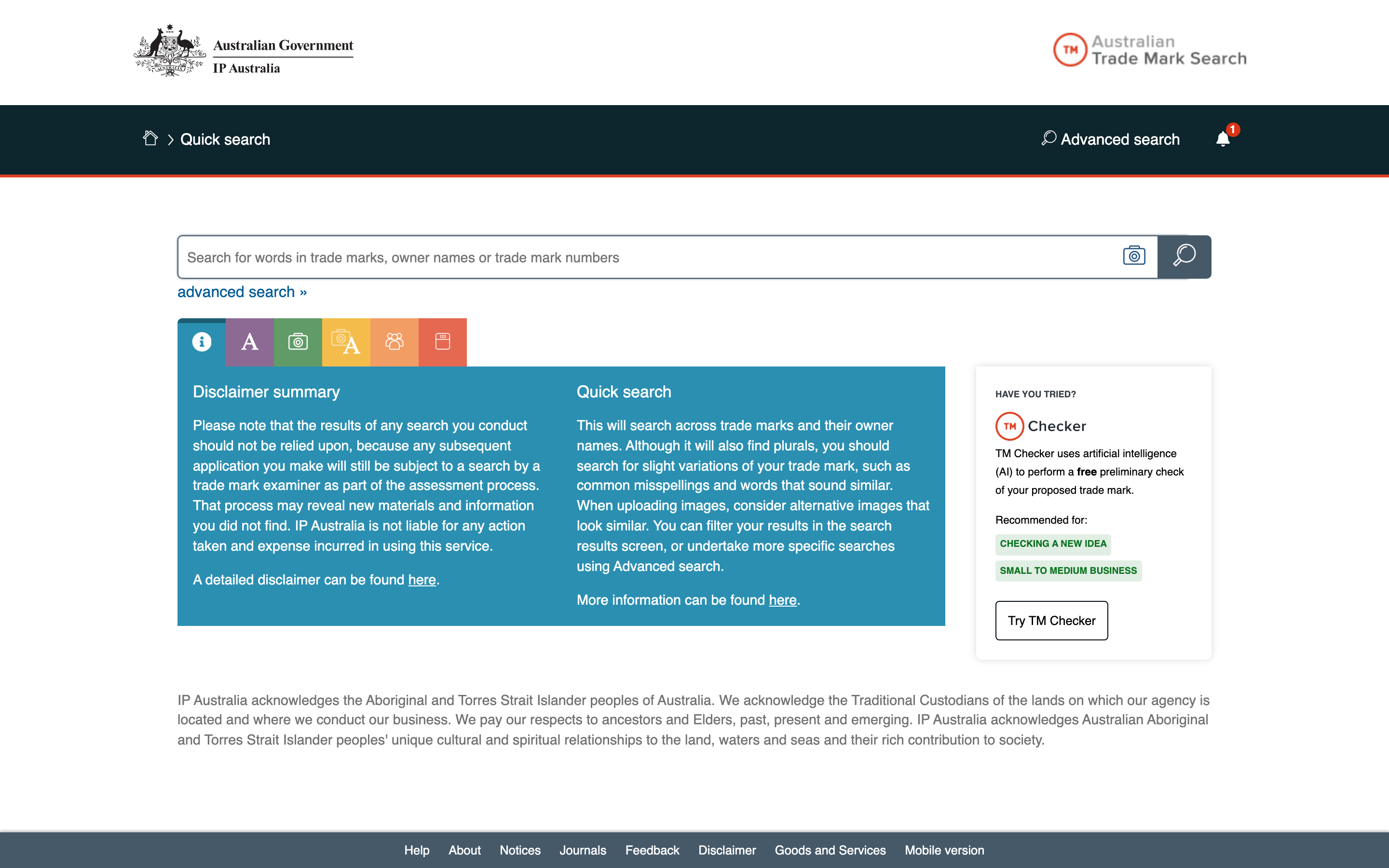
IP Australia's Australian Trade Mark Search quick search page, showing the single search bar for trade mark words, owner names and numbers, with the link to advanced search below it
It automatically finds singular, regular plural and possessive endings. Type TALLOWMERE and it would also return TALLOWMERES and TALLOWMERE'S. That's where the flexibility ends. A mark spelled TALLOWMEAR wouldn't show up. Treat quick search as a first look, never the whole search.
Step 2: Switch to advanced search for sound-alikes and look-alikes
Advanced search gives you seven word match types: Exact, Part, Prefix, Suffix, Stem, Phonetic and Fuzzy. Two of them do most of the clearance work.
- Phonetic uses NYSIIS sound-alike coding to find marks that sound like yours. A TALLOWMERE search could surface TALLOWMEAR or TALOMEER.
- Fuzzy matches on character similarity, which catches near spellings. TALLOMERE, with one W dropped, would likely be a fuzzy hit.
Then run wildcard searches as separate passes. There are three operators:
*stands for zero or more characters. TALLOWMERE* would catch TALLOWMEREDALE.?stands for exactly one character. TALLOWMER? would catch TALLOWMERA.@stands for one or more vowels, and the tool counts Y and H as vowels alongside A, E, I, O and U. T@LL@WM@R@ would catch TALLOWMARE and TOLLOWMERE.
Boolean operators work too, but AND, OR and NOT must be typed in capitals. Quotation marks search for an exact phrase, such as "TALLOWMERE OUTDOOR".
That's three runs at minimum: one Phonetic, one Fuzzy, one @ wildcard.
Step 3: Filter by class and read the goods and services
The class filter covers all 45 Nice classes: 1 to 34 for goods, 35 to 45 for services. For TALLOWMERE, that means Class 25 (clothing) and Class 35 (retail services).
Advanced search includes associated classes by default. These are other classes IP Australia treats as covering related goods or services. Leave that setting on.
You can also search the goods and services text itself. That search ignores punctuation but doesn't find synonyms, so "clothing" won't return a mark described as "apparel". Run each term separately: clothing, apparel, garments, outerwear.
Step 4: Search your logo by image
If you have a logo, upload it. The tool accepts PNG, JPG, GIF, BMP or SVG files up to 8MB and ranks results by visual similarity.
You can select a region of the image, which helps when your logo combines a symbol with text and you only want to match the symbol. Words and images can be combined in one search.
Step 5: Search by owner or number
To see everything one company holds in Australia, search by owner name. Advanced search also filters by ABN or ACN (Australian business and company numbers) and by address for service.
If you already have a trade mark number or an International Registration number, enter it to pull up that record directly.
Step 6: Set status to Pending plus Registered
Results fall into five status groups: Pending, Registered, Refused, Removed and Never Registered. For a clearance search, select Pending and Registered together. That shows every current mark.
Then run a second pass with the three dead groups switched on. Dead records show names somebody once cared about enough to file, and may still be using.
TM Checker: The Free Pre-Check
TM Checker is IP Australia's free, AI-assisted pre-check. You enter your word or logo and your goods and services, and it flags two kinds of likely problems: similarity to existing marks, and distinctiveness (whether your name is too descriptive or generic to work as a trade mark). You don't need an account to run a check.
It's good at one job: killing weak names early. If you have five candidates, TM Checker tells you quickly which ones aren't worth an afternoon of searching.
It isn't clearance. TM Checker gives feedback, not a decision. Examiners decide, and they aren't bound by what the tool told you. Run the full search on any name you're about to spend money on.
If you want an examiner's view before committing, IP Australia offers TM Headstart, a paid pre-assessment of your application. Fees are covered below.
Reading Your Australian Trademark Search Results
Each result shows a status, dates, classes, an owner and the mark itself. Status tells you the most, and IP Australia's labels are more specific than most registers use. Here are the 11 worth knowing.
| Status label | What it means | Risk to you |
|---|---|---|
| Published: Awaiting Examination | Filed and published, not yet looked at by an examiner | Live. It was filed before yours |
| Published: Under Examination | An examiner is assessing it | Live. Outcome pending |
| Accepted: In Opposition Period | Passed examination and advertised; others can oppose | Live. Close to registration |
| Accepted: Opposed | Someone has opposed it | Live. Outcome uncertain |
| Registered/Protected: Registered/Protected | Registered and in force | Live. The one most likely to block you |
| Registered/Protected: Renewal Due | Registered, with renewal coming up | Live. Still fully in force |
| Registered/Protected: Expired Renewal Possible | The term has ended but the owner can still renew | Live. Do not treat as dead |
| Removed/Ceased: Non-use | Removed from the register for non-use | Lower. Check whether the owner still trades |
| Removed Not Renewed: Renewal Fee Not Paid | The owner did not renew | Lower. Check whether the owner still trades |
| Lapsed/Not Protected: Not accepted | The application was not accepted and lapsed | Lower. Worth asking why it failed |
| Withdrawn: Applicant Request | The applicant pulled the application | Lower. The business may still use the name |
Two labels catch people out. Renewal Due and Expired Renewal Possible both look like a mark on its way out. Neither is. The owner can still renew, so treat both as live registrations.
Beyond status, check three things:
- Dates. An earlier filing date generally means priority over a later one. Registration lasts 10 years from the filing date, not the registration date, and can be renewed indefinitely. An old mark isn't a weak mark.
- Goods and services. Read the actual text, not only the class number. Two marks in Class 25 may or may not overlap in practice.
- Owner and mark type. The owner tells you who you'd be dealing with. The type tells you whether the record protects a word, an image, or both.
Assessing conflict risk
Conflict is a spectrum, not a yes or no. Using the invented TALLOWMERE examples:
- High risk: Same or very similar mark, same or associated class, registered or pending. Picture TALLOWMEAR registered in Class 25 for clothing. This is typically walk-away territory unless an attorney says otherwise.
- Medium risk: Similar but not identical mark, related goods or services. Picture TALLOWMEREDALE pending in Class 35 for retail services. Worth a conversation with a trade mark attorney.
- Lower risk: Somewhat similar mark in an unrelated class, or a mark removed for non-use. Typically lower risk, though a removed mark's owner may still be trading (mistake 5).
None of these tiers accounts for unregistered use. That's mistake 3 below.
6 Common Mistakes in Australian Trademark Searches
1. Stopping at quick search
Quick search handles plurals and possessives and nothing more. Conflicts come from marks that sound or look similar, not only from identical spellings. If you haven't run Phonetic and Fuzzy in advanced search, you haven't searched.
2. Treating an ASIC business name or .com.au as trade mark rights
An ASIC business name registration, a company name and a .com.au domain do not give you trade mark rights, and none of them appears in the trade mark register. Someone else can hold the registered trade mark for the exact name on your ASIC record.
3. Assuming Australia is purely first to file
Many guides call Australia a first-to-file country. It's not that simple. Under the Trade Marks Act 1995, the owner of a mark is generally whoever was first to use it in Australia or first to apply, whichever came earlier. A prior user of the same or a near-identical mark for the same kind of goods, who never registered, can oppose your application on that ground (section 58).
Two more wrinkles. Honest concurrent use (section 44(3)) can allow two similar marks to coexist on the register. And unregistered rights are also enforced outside the Act, through passing off and through the Australian Consumer Law's rules on misleading or deceptive conduct.
If you've read about Canada's first-to-use system, the practical lesson is close: a clean register doesn't mean a clean market. Consult a trademark attorney for legal guidance on unregistered rights in your situation.
4. Reading class numbers instead of goods and services
A class number is a bucket, not a description. Keep associated classes switched on, then read what each mark covers.
5. Dismissing removed or lapsed marks
A mark removed for non-use or not renewed is off the register. Its owner may still be trading under the name. Given mistake 3, that trading can matter more than the dead registration. Check whether the business still exists before you write the record off.
6. Treating a clear search as a guarantee
A clean result lowers your risk. It doesn't remove it. Examiners can raise objections your search didn't predict, and someone can file a similar mark between the day you search and the day you apply. The typical approach is to file soon after a clean search.
Beyond the Australian Register
The Australian register is one layer of a full trademark search. Five more are worth knowing.
ASIC business names and domain checks. These don't create trade mark rights, but they're evidence that someone is using a name. Because earlier use counts in Australia, a business trading as Tallowmere Outfitters would be worth knowing about even with no trade mark filing. Add a plain web search and a look at social media handles.
WIPO Global Brand Database. The Australian register shows international registrations that designate Australia. The WIPO Global Brand Database at branddb.wipo.int shows where else those marks are protected, which tells you how far the owner's interest in the brand extends.
TMview. A free multi-office search tool, useful when Australia is one of several markets you're checking. The European trademark search guide covers it.
New Zealand. If you plan to sell on both sides of the Tasman, search the New Zealand register too. It's run by a separate office (IPONZ), and an Australian search tells you nothing about it.
API-based clearance tools. Manual searching doesn't scale if you're building clearance into a product or checking names in volume. Signa indexes IP Australia records directly (2.33 million marks, synced daily) alongside other major offices, so Australia becomes one part of a multi-office search instead of a separate manual step.
Australian Trademark Costs and Timeline (2026)
Searching is free. Filing isn't. These are IP Australia's 2026 figures, in Australian dollars.
Filing fees:
- Standard application using the picklist of goods and services: AUD $250 per class
- Standard application with custom wording: AUD $400 per class
The picklist is IP Australia's own list of goods and services descriptions. Writing your own wording costs AUD $150 more per class, so check the picklist first.
TM Headstart:
- Part 1, pre-assessment: AUD $200 per class
- Part 2, converting to a standard application: AUD $130 per class
- Minimum total: AUD $330 per class
Headstart deadlines are tight. You get 5 business days from the examiner's report to amend and to formalise the application, or it lapses.
Disputes:
- Notice of Intention to Oppose: AUD $250, filed within 2 months of the acceptance being advertised.
- Non-use removal application: from AUD $350. A registration can be removed after a continuous 3-year period of non-use.
IP Australia Trade Mark Fees (2026, AUD)
Timeline:
- Filing to examination: usually 3 to 4 months
- Opposition period: 2 months from advertisement of acceptance
- Filing to registration: at least 7 months
That 7-month floor is IP Australia's own figure, so even a flawless application won't register faster.
Renewal is charged per class. For the amount, check IP Australia's current fee schedule. If you use a trade mark attorney, their fees sit on top of everything here.
Your Next Steps
- Run a quick search for your name on Australian Trade Mark Search.
- Switch to advanced search. Run a Phonetic search, a Fuzzy search and one
@wildcard pass, with status set to Pending plus Registered. - Read the goods and services text for every close result, with associated classes left on.
- Sanity-check the name with TM Checker.
- Check WIPO for international marks, then ASIC, domains and the web for unregistered use.
- If you find a possible conflict, talk to a trade mark attorney before filing. If the search looks clear, the typical approach is to file promptly.
If Australia is one of several markets, the UK trademark search guide and the Canada trademark search guide follow the same approach for those registers.
For API-based clearance across multiple offices, explore Signa's trademark search.
A careful Australia trademark search costs nothing but time. Skipping it can cost you AUD $250 per class on a name you can't register, or an opposition from a prior user you never knew existed.
Consult a trademark attorney for legal guidance specific to your situation. This guide explains the process and the tools available, but it's not a substitute for professional legal advice.